
Author: Jonathan
Royalty Free Documentary Music
YoPo Music has specialised in producing innovative royalty free documentary music for the BBC and broadcast productions since it started.
In this post we take a look and listen to some of the most popular documentary music prodcued by YoPo Music.
To preview and purchase any of the tracks on this page just go here and select “Documentary” in the category drop down list.
1. Documentary Piano No 13
2. Documentary Piano No 25
3. Documentary Strings No 7
4. Electro Documentary No 02
5. Line of Duty
To preview and purchase any of the tracks on this page just go here and select “Documentary” in the category drop down list.
Jerusalem by Hubert Parry
Now available as a royalty free proruction music track – Hubert Parry’s stirring English anthem “Jerusalem”.
Orchestra version of Hubert Parry’s glorious nostalgic and rousing hymn “Jerusalem”.
The words were written by William Blake, and the hymn has become popular as an English patriotic anthem.

And did those feet in ancient time,
Walk upon Englands mountains green:
And was the holy Lamb of God,
On Englands pleasant pastures seen!
And did the Countenance Divine,
Shine forth upon our clouded hills?
And was Jerusalem builded here,
Among these dark Satanic Mills?
Bring me my Bow of burning gold:
Bring me my Arrows of desire:
Bring me my Spear: O clouds unfold:
Bring me my Chariot of fire!
I will not cease from Mental Fight,
Nor shall my Sword sleep in my hand:
Till we have built Jerusalem,
In Englands green & pleasant Land.
How to work out the Beats Per Minute (BPM) of a song
A really easy way to work out the BPM of a song or loop is to use an online BPM calculator.
Midi note number to midi key plus frequency chart
Free download: Download a handy freqency in Hz, midi note & note number chart. 2 versions: Based on middle C as C3/60 and also C4/60
Free Bosun’s Pipe Whistle Sound Effects
Pipe aboard your ship

Bosun’s Whistle
Pipe aboard your ship
To download your free copy please click here
For more sound effects – take a look here
How to tighten the timing of audio in Reaper using Stretch Markers. Improve the quality of your audio
How to tighten the timing of audio in the Reaper DAW. Using stretch markers to improve the playing and timing of a recorded piano piece. Recorded on a 1930s Berlin built Steck upright piano to a click track. By adding Reaper stretch markers to the main transients you can move parts of the recorded audio to tighten up the timing to the grid or beat. To manually add a stretch marker place the cursor where you want it to go on the wave form within an item – usually just before transient (highest / loudest part of the waveform) and click while holding down option/alt and cmd/ control. To remove a stretch marker – option or alt click it.
Spirit of Japan
The Spirit of Japan
The Spirit of Japan as featured on the BBC series “The Art of Japanese Life”. The tracks draw inspiration from traditional Japanese and East Asian Music.

Watermarking your audio files
If you have audio files that you would like to protect, then one way to do this is audio watermark them. In other words, add an extra piece of audio, like a voiceover or sound effect, to the audio file that repeats perhaps every ten seconds or so. If you have a lot of files, then to do this manually would take a lot of time.
AG Watermark Generator

Luckily there is a very good program to do all the work for you, and you can download a free demo and try it out.

Setting up the Deopfer LMK2 to play piano
A quick start to setting up the excellent LMK2 midi keyboard made by Deopfer, to feel more realistic playing and recording piano. To find all the details of what this keyboard can do you can find the Doepfer manual here.
One thing to be wary of…
Make sure you are not unintentionally using a preset which is duplicating the midi information on multiple channels, as you could end up with a nasty phasy sound if your sound source is set to receive on all channels.

Presets
There are 17 presets available to you. Preset 2 – 17 will revert to their factory settings when you turn the keyboard on…in other words you will lose any changes you have previously made. Luckily changes made to PRESET 1 will be remembered when you shut the keyboard down.
Here is a list of all the presets. If you look at say Preset 13, you can see this one will send out your note information on channel 1 and 2. To check which preset you are on, hit the preset button – if it’s ok just hit another button to clear it.
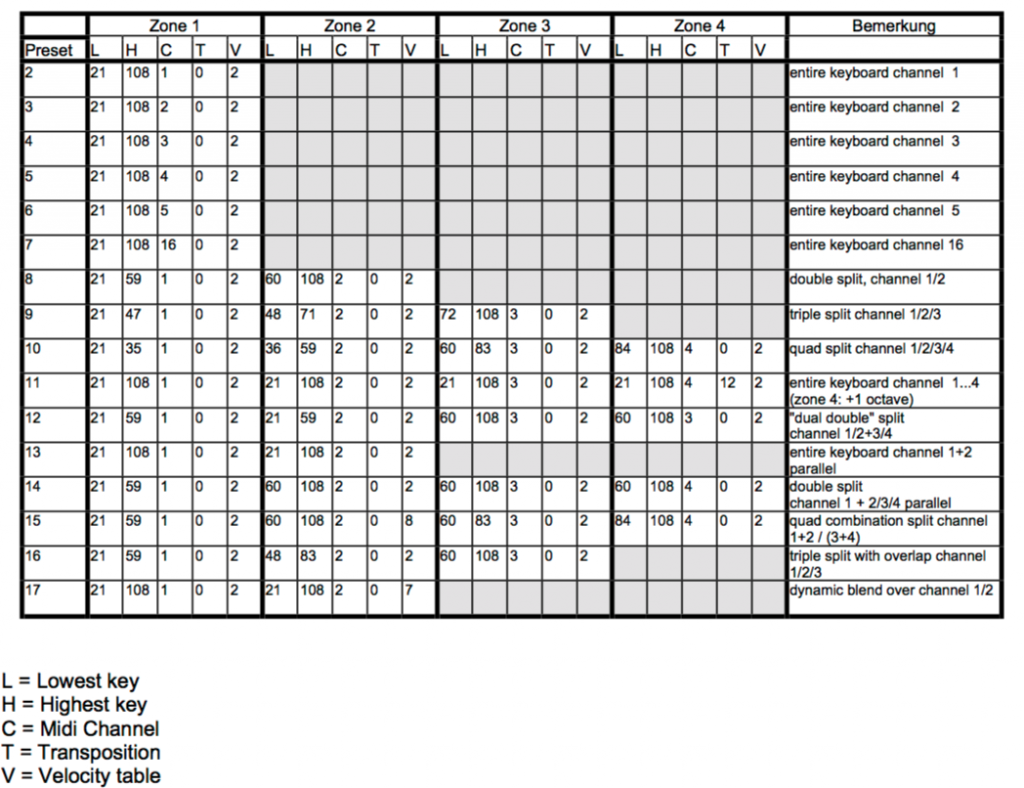
To change your preset you need to do the following:
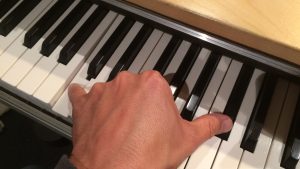
Hit the preset button and hold down the C0 key and then C1 key an octave higher at the same time. Release and that combination will load load Preset 1. Pressing C0 & C#1 together will load Preset 2 etc.
Velocity Curves
If you want to keep the changes we’re going to make then load up Preset 1 so the keyboard will remember your changes for your next session.
To get a nice piano feel to the keyboard which works with your piano samples, it’s worth trying out the various velocity curves that are available. There are 8 to choose from – and then importantly another 8 (9-16) which are the same as 1-8, except that with the second group, holding down a key very very gently will, like on a real piano, produce no sound. On 1-8 curves you can’t transmit a 0 velocity. I usually use 9, 10 or 11.
Here are the velocity curves from the manual:
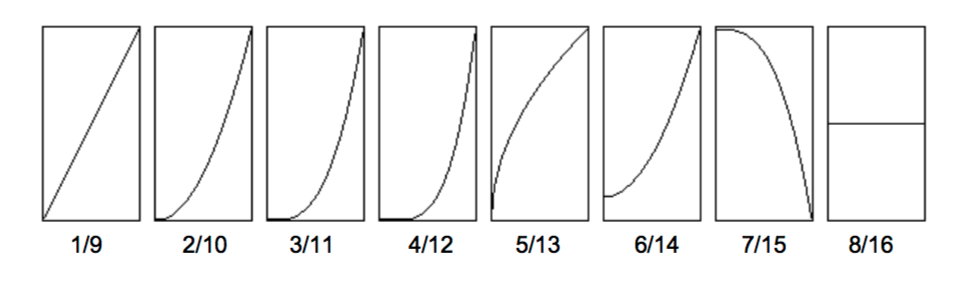
To change the velocity curve hit the velocity button and then as before hold down C0 and then C1 will be curve 1, C# curve 2 etc – so curve 10 is A1.
Splits
This defines the area of the keyboard designated to any of the 4 zones. So for my simple piano setup I just have zone 1 on channel 1 set to the whole keyboard.
To achieve this hit the ‘Split’ button at which point you will see the lowest note displayed with a number e.g. ’21’. When the display reads ‘Lo’ – hit your lowest key. The display should then display your highest key e.g. ’99’ and then ‘Hi’ – and you hit your highest key. Done.